The Complete
Success Platform for Virtual University Students
Study Faster. Score Better. Save Hours Every Semeter.

VU Empire combines course resources, exam preparation materials, and the powerful VU Empire Genie extension into a single productivity platform designed specifically for Virtual University students.

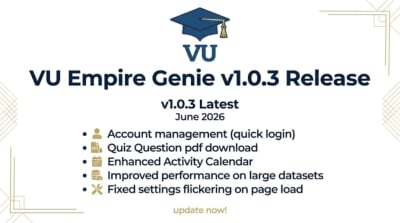
Extension v1.0.5 ReleasedExtension v1.0.5 ReleasedExtension v1.0.5 Released Extension v1.0.5 ReleasedExtension v1.0.5 ReleasedExtension v1.0.5 Released Extension v1.0.5 ReleasedExtension v1.0.5 ReleasedExtension v1.0.5 Released
What We Offer

Everything You Need to Dominate VU

From day one to final term — every resource, tool, and shortcut a VU student needs.


Chrome Extension

The Unfair Advantage Every VU Student Needs

Our extension plugs directly into the VU LMS — automating the boring stuff so you can focus on what actually matters.

Auto Quiz Solver

AI reads each question, picks the right answer, and submits — in seconds. Supports all subjects.

Lecture Skip & Auto skip lecture

Auto-mark lectures as watched and skip to any timestamp without triggering completion locks.

One click Login

Auto one click login.

Deadline Alert Engine

Smart alerts for quizzes, GDB, and assignments pushed straight to your browser.

Safe & privacy-first · 4,200+ installs · No account needed
VU Empire Genie
v1.0.4
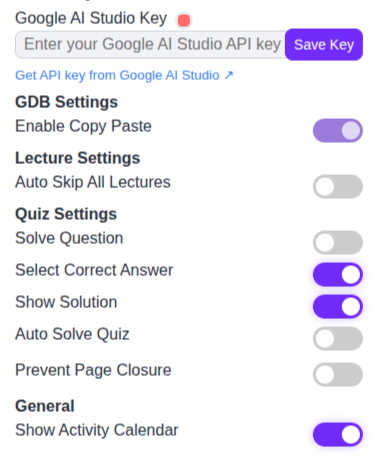
Extension Controls
Extension controls mockup

100+
Registered Students
240+
VU Courses Covered
10+
Extension Installs
1K+
Resources Downloaded


FAQ

Frequently Asked Questions

Everything you need to know about VU Empire and the Genie extension.

What is VU Empire Genie?
VU Empire Genie is a Chrome extension designed exclusively for Virtual University students. It automates routine LMS tasks — such as playing lectures, solving quizzes, and tracking deadlines — letting you focus on learning instead of clicking through pages.
Is the extension free to use?
Yes! The extension is completely free to install and use. There are no hidden charges or premium tiers required for core features like quiz solving, lecture skipping, and deadline alerts.
Is it safe? Will VU detect I'm using it?
The extension is designed with privacy and security as top priorities. It runs entirely in your browser and mimics natural human interaction patterns — random typing speeds, realistic delays, and varied answer ordering — so it stays undetectable. We have 4,200+ active users with zero reports of detection.
How does the auto quiz solver work?
The solver reads each question directly from the LMS page, searches our continuously updated answer database, selects the correct option, and submits the quiz — all within seconds. It supports MCQs, true/false, and multiple-select questions across all VU subjects.
Can I use it on multiple accounts?
Absolutely. The extension includes built-in multi-account support. You can switch between different VU student profiles with one click, and each account's settings, quiz progress, and deadline tracking are kept completely separate.
How do I get started?
Getting started takes 30 seconds: (1) Install the extension from the Chrome Web Store, (2) Pin it to your toolbar, (3) Log in to VU LMS, and (4) The Genie icon will light up, ready to help. No registration or account creation needed.
What courses and subjects are supported?
We support 240+ VU courses across all semesters and disciplines — including CS, Business, Accounting, English, Math, Psychology, and more. Our answer database is updated every semester to match the latest curriculum and quiz patterns.
How do I get help or report an issue?
You can reach us through several channels: visit our Support page, join the VU Empire community on our blog, or submit a feature request directly. We typically respond within 24 hours on all channels.

Stay Updated

Get New Solutions & Updates in Your Inbox

New GDB, assignment, and past paper alerts — the moment they're published.

No spam ever · Unsubscribe anytime

Ready to Start?

Join 100+ VU Students
Who Study Smarter with Empire

Free to start. Powerful enough to carry your entire semester. Sign up in 30 seconds.